MCP: Model Context Protocol: A Playbook for Next Gen AI Tools Builders LLMs are
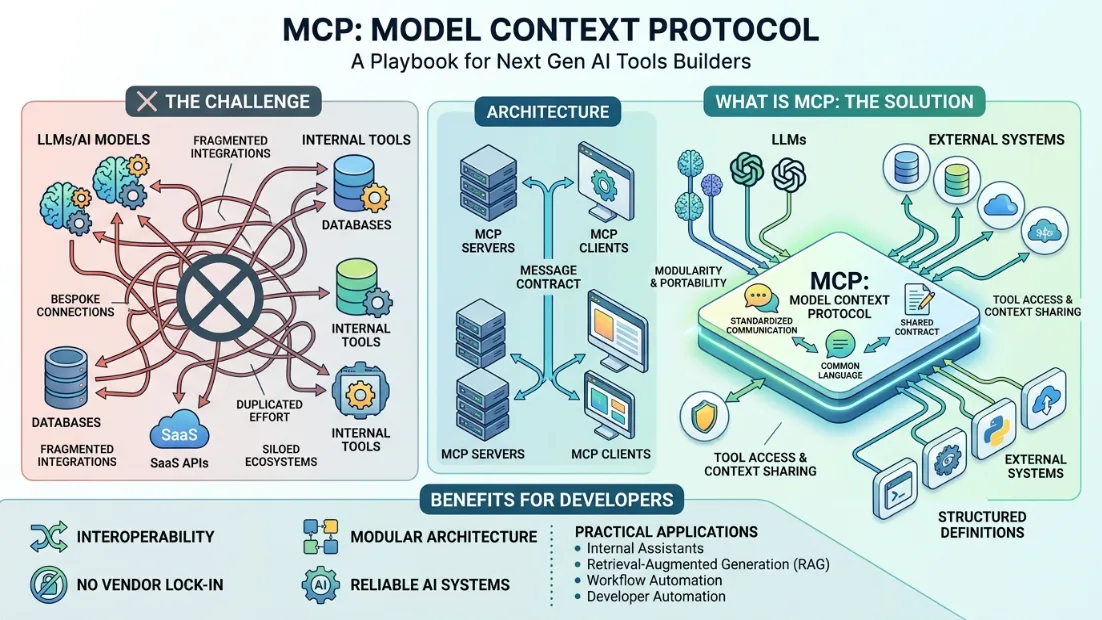
MCP: Model Context Protocol: A Playbook for Next Gen AI Tools Builders
Introduction
LLMs are indeed an exciting new technology that continues to advance, but they run into a very significant issue when needing to interface with real systems: there is no common standard for how models can communicate with external tools. This is where the Model Context Protocol (MCP) comes into play; it standardizes how AI models communicate with purpose-built tools, making their integration across applications more reliable.
The Challenge
Most AI applications will need to connect with different external systems—databases, SaaS APIs, and internal tools—but existing integrations are typically bespoke and lead to siloed ecosystems and duplicated effort. This allows modularity and portability by MCP using AI systems with a common language.
What is MCP
MCP is an open protocol for LLMs to access tools and contextual information in a standardized way. It describes how to expose tools, how to share context and how response is structured, effectively eliminating the need for bespoke integration.
Problems Solved
As a tool, MCP aims to solve some of these limits in AI tooling — including fragmented integrations, lack of portability, security issues and context management. It offers a shared contract for interoperability across models, tools and other artifacts, strengthening the security with explicit permissions layers along with structured definitions.
Architecture
MCP's architecture consists of MCP servers, which provide functions such as APIs and databases, and MCP clients, which are usually AI applications that discover and invoke tools. This is crucial for proper tool invocation and context sharing via the message contract.
Benefits for Developers
MCP provides professional developers with interoperability, modular architecture, tool generation without vendor lock-in and more reliable AI systems. Practical applications range from internal business assistants, retrieval-augmented generation systems and developer assistants/automation to workflow automation.
Getting Started
To use MCP, developers need to discover external tools and then create the wrappers for those tools that are compatible with MCP. Then they can connect an MCP client and define security policies before writing simple workflows.
Create an MCP Server (Python)
from fastmcp import FastMCP

app = FastMCP(name="weather-server")

@app.tool()
def get_weather(city: str) -> str:
    return f"Weather in {city}: 22°C, Sunny"

app.run()
Configure MCP Client
{
  "mcpServers": {
    "weather": {
      "command": "python",
      "args": ["server.py"]
    }
  }
}
Use in Claude
from anthropic import Anthropic

client = Anthropic()

response = client.messages.create(
    model="claude-3-5-sonnet-20241022",
    tools=get_mcp_tools(),
    messages=[{
        "role": "user",
        "content": "What is the weather in France?"
    }]
)
One MCP server. One configuration. Works with any LLM. No rewriting.
Conclusion
MCP is a big step toward creating a more open and interoperable AI ecosystem, allowing for seamless interaction between models, tools, and services.
Amara Diallo
Writer at DevPulse covering AI & ML.