Kubernetes for Beginners: Managing Containers at Scale
Kubernetes for Beginners: Managing Containers at Scale
Almost every modern Application is built for cloud, and is containerized for deployment. Managing the containers at runtime poses a major challenge in the deployment of such applications, and that is where Kubernetes comes into play. Kubernetes, which is also sometimes referred to as container run time, and often abbreviated as K8s is a tool used for Container Orchestration. This article is an introduction to Kubernetes and why is considered the container orchestration platform of choice.
What is Kubernetes?
Kubernetes or K8s for short is a container orchestration tool developed by Google. Kubernetes, which translates from Greek to "helmsman" or "pilot", automates the process of deploying, managing and scaling containerized applications to a cluster of worker nodes.
Kubernetes is explained many times as being similar to an orchestra with the control plane as the conductor and the containers as the musicians playing the music which is a successful deployment of the application. To prove the analogy to be true, the music needs to be replaced with the application being deployed and running and the musicians replaced with the containers that will run the application. With that in mind, the conductor of an orchestra has to arrange all the musicians on stage so that they produce the wonderful music that we are all listening to. In the same way, the Kubernetes control plane has to arrange all the necessary containers required for a successful deployment of an application.
Key Benefits of Kubernetes
Automated Deployment and Rollbacks: Be able to deploy new versions of an application automatically and roll back to a previous version in case of trouble occurs
Self-Healing: Automatically restarts failed containers and reschedules them
Load Balancing: Distributes traffic across your containers
Resource Optimization: Efficiently allocates CPU and memory resources
Horizontal Scaling: Automatically scales applications up or down based on demand
Multi-Cloud Compatibility: Runs on any cloud provider or on-premise infrastructure
Core Kubernetes Concepts
Before diving into Kubernetes, you need to understand some fundamental concepts.
Pods
In Kubernetes, a Pod is the basic computing unit, and the smallest deployable unit of work in Kubernetes. A Pod consists of one or more containers based on the Docker container run-time. Pod objects are ephemeral, highly disposable and can be created and deleted in a very short period of time.
apiVersion: v1
kind: Pod
metadata:
  name: hello-pod
spec:
  containers:
  - name: hello-container
    image: nginx:latest
    ports:
    - containerPort: 80
Nodes
In Kubernetes, a Node is a physical or virtual worker machine instance running on a cluster. A Node may have many roles. Some examples include, though are not limited to, offering computing resources that can run pods, or simply offering storage for data. A Kubernetes cluster can consist of a large number of different types of nodes. Ideally, a cluster can have more than one type of node for different workloads. A node can also run multiple pods at the same time.
Clusters
A cluster is a collection of nodes, under the management of a control plane. The control plane is responsible for deciding and acting upon the state changes occurring in the cluster.
Services
A Service provides a stable network endpoint which can be reached from outside your cluster. Your pods are ephemeral in nature and hence do not have static IP addresses, but with a Service your application always has a network endpoint to reach it.
apiVersion: v1
kind: Service
metadata:
  name: my-service
spec:
  selector:
    app: MyApp
  ports:
  - protocol: TCP
    port: 80
    targetPort: 9376
  type: LoadBalancer
Deployments
Deployments describe desired state for Pods and ReplicaSets. Feature for deployments includes scaling, rollouts and rollbacks.
apiVersion: apps/v1
kind: Deployment
metadata:
  name: nginx-deployment
spec:
  replicas: 3
  selector:
    matchLabels:
      app: nginx
  template:
    metadata:
      labels:
        app: nginx
    spec:
      containers:
      - name: nginx
        image: nginx:1.14.2
        ports:
        - containerPort: 80
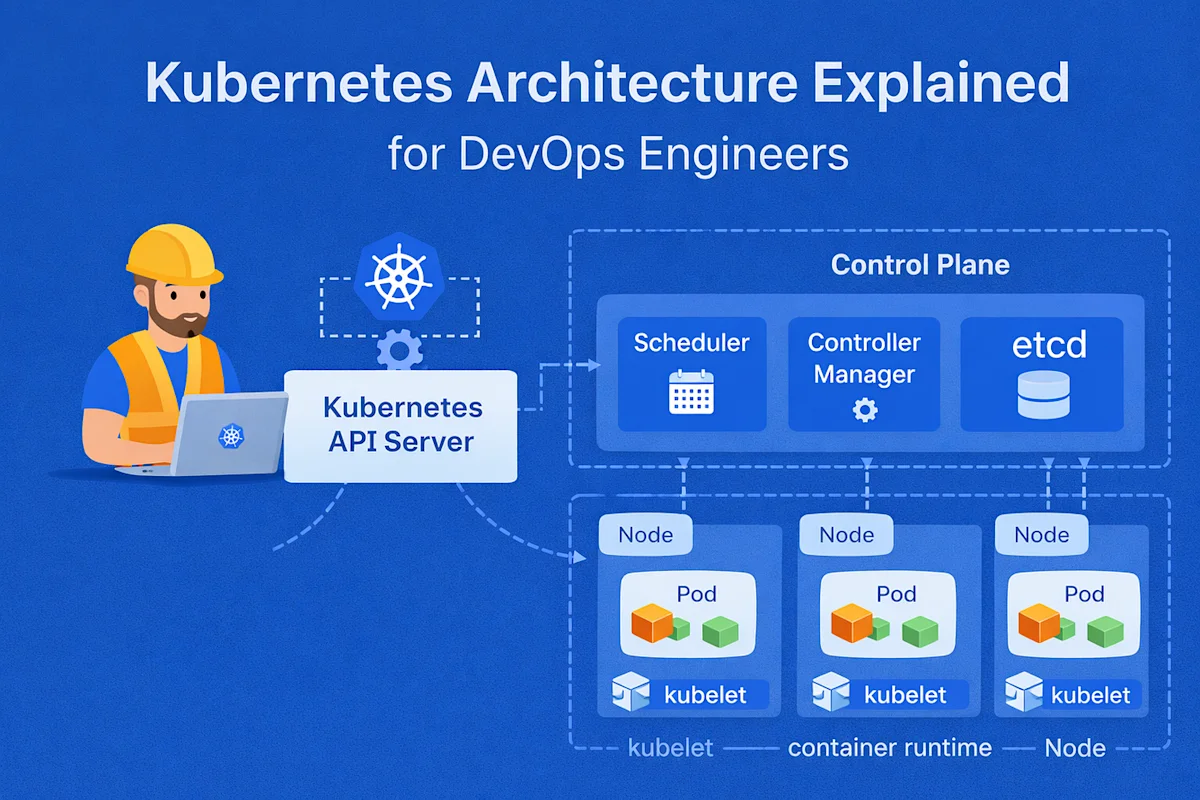
Kubernetes Architecture
Understanding Kubernetes architecture helps you grasp how it manages containers effectively.
Control Plane Components
The control plane manages the overall state of the cluster:
API Server: The central management entity that exposes the Kubernetes API
etcd: A distributed key-value store that holds cluster configuration data
Scheduler: Assigns pods to nodes based on resource requirements
Controller Manager: Runs multiple controller processes that regulate cluster state
Node Components
Nodes run the following components:
kubelet: An agent that ensures containers run in pods
Container Runtime: Software (like Docker) that runs containers
kube-proxy: A network proxy that maintains network rules on nodes
Getting Started with Kubernetes
Installation Options
For beginners, here are the easiest ways to get started:
Minikube - Local Single Node Cluster Minikube is local single node container lazer that runs inside a Virtual Machine (VM) and is used for development, learning and some other testing work on Kubernetes.
Docker Desktop: Includes a built-in Kubernetes cluster (Windows/Mac)
Kind: Runs Kubernetes using Docker containers
Kubernetes providers, also known as Cloud Providers Offered by various companies like Google Kubernetes Engine (GKE), Amazon EKS, Azure AKS, and more.
Setting Up Minikube
# Install Minikube (on macOS with Homebrew)
brew install minikube

# Start a local Kubernetes cluster
minikube start

# Verify installation
kubectl cluster-info

# View nodes
kubectl get nodes
Basic kubectl Commands
Kubectl is a command-line tool for Kubernetes.
Basic commands include:
Deploy an application:
kubectl create deployment hello-world --image=hello-world
View deployments:
kubectl get deployments
View pods:
kubectl get pods
Display pod details:
kubectl describe pod
View logs:
kubectl logs
Scale a deployment:
kubectl scale deployment hello-world --replicas=3
Remove a deployment:
kubectl delete deployment hello-world
Apply configuration from a file:
kubectl apply -f deployment.yaml
Deploying a Simple Web App
A simple web app can be deployed like this:
YAML:
apiVersion: apps/v1
kind: Deployment
metadata:
  name: web-app
spec:
  replicas: 2
  selector:
    matchLabels:
      app: web-app
  template:
    metadata:
      labels:
        app: web-app
    spec:
      containers:
      - name: web-app
        image: nginx:latest
        ports:
        - containerPort: 80
        resources:
          requests:
            memory: "64Mi"
            cpu: "250m"
          limits:
            memory: "128Mi"
            cpu: "500m"
---
apiVersion: v1
kind: Service
metadata:
  name: web-app-service
spec:
  selector:
    app: web-app
  type: LoadBalancer
  ports:
  - port: 80
    targetPort: 80
Deploy the app:
Save the YAML to app.yaml, then:
kubectl apply -f app.yaml
Check the deployment:
kubectl get deployments

kubectl get pods

kubectl get services
Access the service:
minikube service web-app-service
Beginner's Best Practices
Use namespaces for organization
Set resource requests and limitations
Implement health checks
Secure RBAC
Apply ConfigMaps and Secrets
Start simple and increase complexity as needed
Use Prometheus and Grafana to monitor applications
Common Problems and Fixes
Debugging Failing Pods
kubectl describe pod

kubectl logs

kubectl logs --previous

kubectl exec -it -- /bin/bash
Challenge: Managing Storage
Kubernetes provides PersistentVolumes and PersistentVolumeClaims for persistent storage management.
Conclusion
Kubernetes can seem a very complex piece of software, but understanding a little bit of the underlying system makes it into a truly awesome tool. By focusing on the higher level concepts, a lot of the low level infrastructure is heavily abstracted, which makes managing large applications really easy.
Kubernetes in Action - 1st Edition - Scott Lowe, William Gottard, Mark Chapman Download PDF Free LearnXyah Start here by installing Minikube, deploying your first application, and then expanding on that by introducing more features. Playing with a dev cluster that is tied to the community is a great way to get started; the official documentation and many tutorials are good places to start.
Everyone has to start from scratch. All the experts in Kubernetes started as beginners too. You too can start playing and learning the container orchestration of Kubernetes. Through trials and errors, the perseverance to learn and the understanding of the cloud-native concepts, you will soon become proficient in the handling of the deployment of applications on cloud environments.
Amara Diallo
Writer at DevPulse covering DevOps.